In short
A valid custom thumbnail can be refused with a 403 when a stream starts, and the broadcast then goes live with an automatic frame. We cannot confirm the cause in the single anonymised case we saw; the article lists what YouTube documents about custom thumbnails and what to check.
What We Saw
A creator started a 24/7 stream with YouCast, and the YouTube broadcast went live with an automatic frame instead of the custom thumbnail they had set.
We checked the file first. It was a real JPEG at 1280 × 720 and a few hundred kilobytes, well within YouTube's limits. The image was not the problem.
When the stream started, YouTube answered the request to set the thumbnail with an HTTP 403 "forbidden" error. The stream still started, only without the thumbnail. The next broadcast, about 40 minutes later, accepted the same file and showed the custom thumbnail.
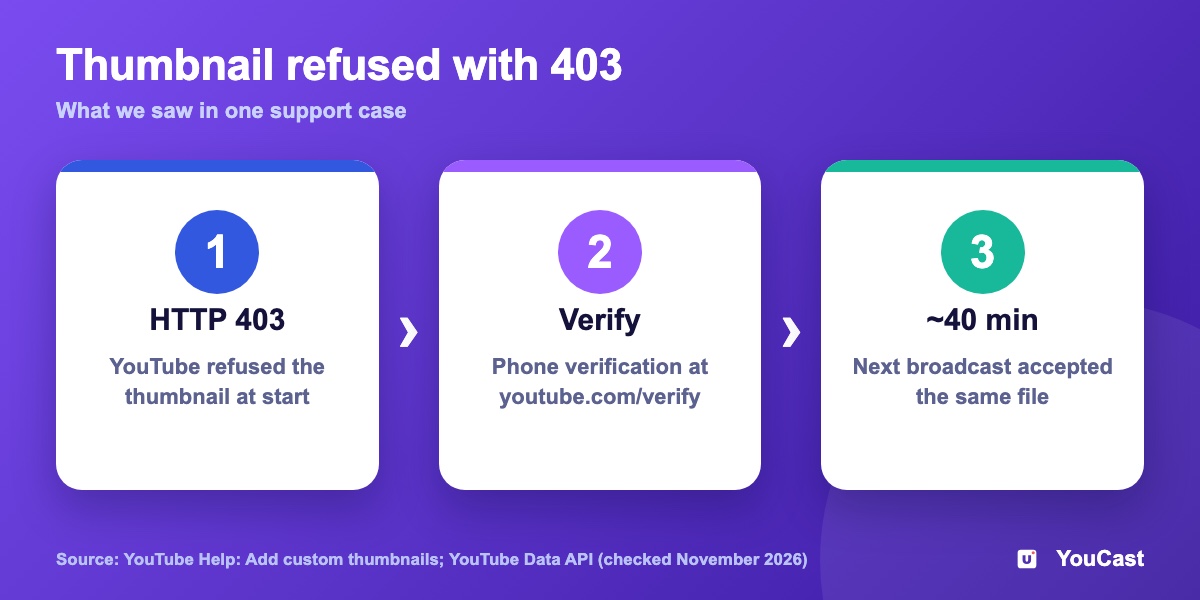
The case is anonymised. We do not store a channel's verification status, so we cannot confirm why YouTube changed its answer. The rest of this article is what YouTube documents.
What YouTube Says About Custom Thumbnails
YouTube Help says you can upload your own thumbnail if your account is verified. Its page on verifying your account lists custom thumbnails and live streaming among the features that need phone verification.
For developers, YouTube documents the thumbnail upload method and its errors. A 403 "forbidden" answer comes with one of two messages:
- "The thumbnail can't be set for the specified video. The request might not be properly authorized."
- "The authenticated user doesn't have permissions to upload and set custom video thumbnails."
YouTube's page does not say which situation produces which message. In our reading, verification is the first thing to check, because YouTube lists it as a requirement. That is our interpretation, not a YouTube statement.
What to Check
Thumbnails also have to follow YouTube's Community Guidelines, so a refused thumbnail can have other causes than permissions.
- 1Verify your channel at youtube.com/verify. YouTube sends a code by text message or voice call.
- 2After you press start, open the stream on YouTube and look at the thumbnail.
- 3If it is missing, upload the thumbnail by hand in YouTube Studio for the running broadcast.
- 4Check the image against YouTube's specs: 16:9, JPG or PNG, at least 640 px wide.
- 5Make sure the channel has not reached the daily limit. YouTube Help says to try again in 24 hours if you see "Daily custom thumbnail limit reached".
What YouCast Does at Stream Start
When a stream starts, YouCast sends the thumbnail you chose to YouTube. If YouTube refuses it, the stream still goes live and YouTube shows an automatic frame.
After a restart, YouCast creates a new broadcast and sends the thumbnail again, so a thumbnail that was refused once can be accepted on the next run.
Because the stream starts either way, open it on YouTube right after you press start and check the thumbnail.
Frequently asked questions
Why did my stream start with an automatic frame instead of my custom thumbnail?
The broadcast went live and YouTube refused the custom thumbnail with a 403 response. In the case we saw the thumbnail itself was valid; the article lists what YouTube documents about custom thumbnails and what to check.
Does a refused thumbnail always mean a missing permission?
No. Thumbnails also have to follow YouTube’s Community Guidelines, so a refused thumbnail can have other causes than permissions.
Do you know why YouTube changed its answer in this case?
No. The case is anonymised and we do not store a channel’s verification status, so we cannot confirm the cause; the rest of the article is what YouTube documents.
Skip the Setup With YouCast
YouCast turns the videos you upload into a 24/7 live stream that runs from the cloud, to YouTube and, with a stream key, to Twitch, Kick and Instagram, so there is no encoder to configure, no computer to keep awake and no home upload line to saturate.
Set the thumbnail when you create a stream in YouCast, and verify your channel first so YouTube accepts it. YouCast sends the thumbnail again after every restart.
You can try one stream on the free trial and add more streams as the channel grows.
Sources
- YouTube Help: Add custom thumbnails on YouTube — checked October 2026
- YouTube Help: Verify your YouTube account — checked October 2026
- YouTube Data API: Thumbnails: set (errors) — checked October 2026
- YouTube: Verify your channel — checked October 2026
Further reading
- YouTube Help: Get started with live streaming — Official overview of live streaming on YouTube
- YouTube Help: Choose live encoder settings, bitrates, and resolutions — The ingestion settings table
- YouTube Help: YouTube Partner Program overview & eligibility — Thresholds and benefits
- YouTube Help: YouTube channel monetization policies — What reviewers check
Start Your 24/7 Stream Today
No PC needed. No OBS. Just upload your video and go live on YouTube — 24/7, from the cloud.