Can You Multistream on KICK?
KICK's help page says yes, you can stream to any platform, including Twitch and YouTube. The article and the feature are exclusive to streamers in the KICK Partner Program.
When You Must Flip the Toggle
You can also use chat commands: type /multi on to turn Multistreaming on and /multi off to turn it off.
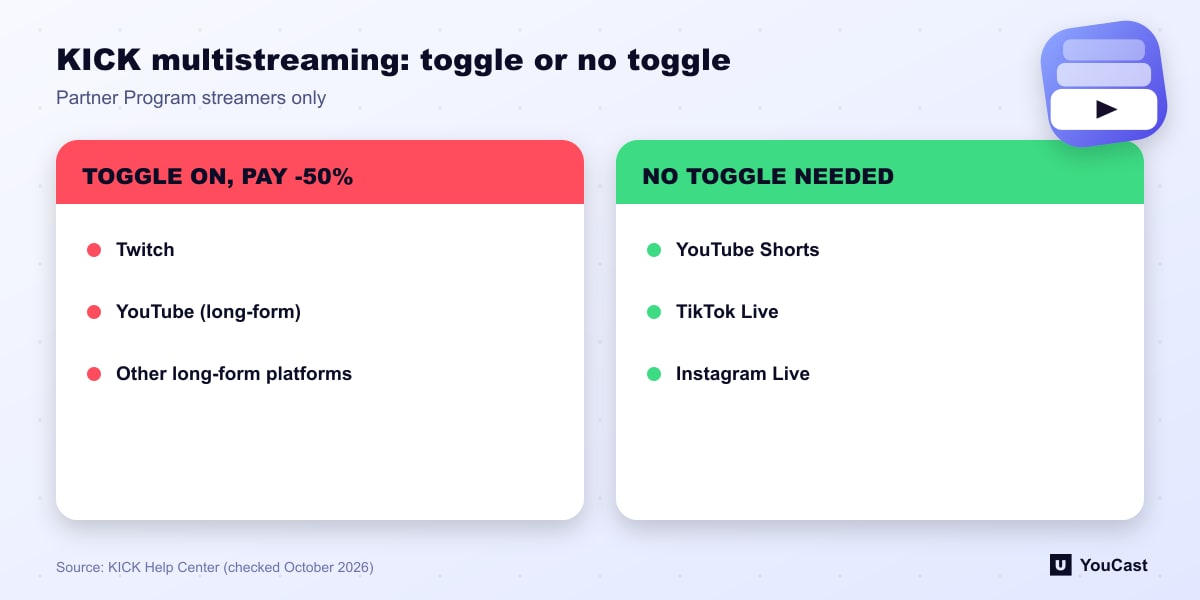
- Long-form livestreaming platforms such as Twitch or YouTube: enable the Multistreaming toggle.
- Short-form or vertical platforms such as YouTube Shorts, TikTok Live or Instagram Live: no toggle needed.
- The toggle sits under the Partner Income toggle in your dashboard, and you turn it on after starting your stream.
What It Costs
KICK states that if you multistream with the toggle enabled, your payout is reduced by 50% for the duration of the multistreaming session.
Our reading: the reduction is tied to sessions with the toggle on, so the length of those sessions matters. Check the current rules before you plan a 24/7 multistream that includes KICK.
How Other Platforms Handle It
Twitch allows simulcasting with limits on how you promote other platforms, and YouTube describes simulstreaming as a normal workflow with an upload-speed rule. The three approaches differ, so read each platform's own page before you configure a multistream.
Skip the Setup With YouCast
YouCast turns the videos you upload into a 24/7 live stream that runs from the cloud, to YouTube and, with a stream key, to Twitch, Kick and Instagram, so there is no encoder to configure, no computer to keep awake and no home upload line to saturate.
If you send the same content to Kick and to another long-form platform, remember the KICK rule above about the Multistreaming toggle. In YouCast each stream goes to one destination from the cloud, so the upload does not go through your own line.
You can try one stream on the free trial and add more streams as the channel grows.
Sources
- KICK Help Center: Multistreaming on the KICK partner program — checked October 2026
Further reading
- KICK Help Center: How to stream on KICK.com — Setup and encoder settings
- KICK Help Center: Understanding KICK's revenue split — The 95/5 split
- KICK Help Center: KICK payout schedule, thresholds, and methods — How payouts work
- Twitch Help: Broadcasting Guidelines — Official broadcast rules
Start Your 24/7 Stream Today
No PC needed. No OBS. Just upload your video and go live on YouTube — 24/7, from the cloud.