What the List Is
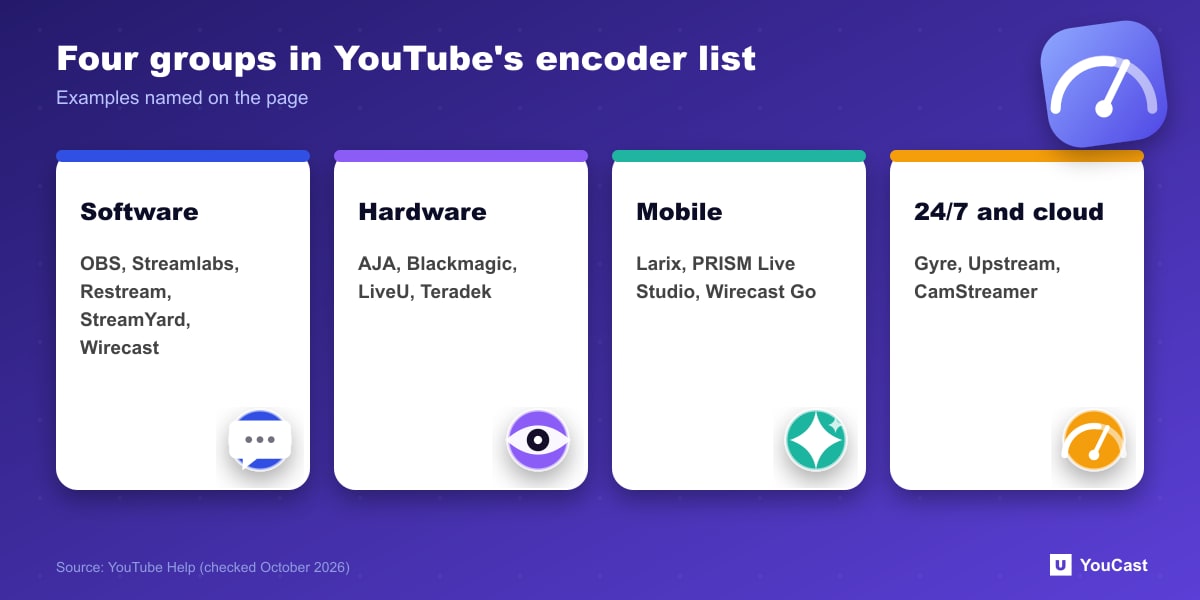
YouTube's encoder page includes a list of YouTube Live verified encoders in three groups: software, hardware and mobile. The page states that none of these products are made by YouTube and tells creators to evaluate them and decide which option makes the most sense.
Our reading: it is a directory of tested tools, not a ranking and not an endorsement. Pick by your use case.
The Mainstream Software Encoders
The software group includes the names most streamers already know. YouTube's descriptions, in short:
- Open Broadcaster Software (OBS): open source software for video recording and live streaming at no charge.
- Streamlabs: described as built on OBS with alerts, tipping and themes.
- Restream and StreamYard: browser-based studios with guests, overlays and multistreaming.
- Wirecast and XSplit Broadcaster: production software for Windows and Mac.
Listed Tools Built for 24/7 Streams
Several entries describe continuous or pre-recorded streaming without a camera, and YouTube's descriptions say:
These descriptions are written by the listed vendors and published on YouTube's page. Check pricing, limits and current features on each vendor's own site before choosing.
- Gyre: a cloud-based tool for 24/7 live streaming of pre-recorded videos on YouTube, with a built-in video converter.
- Upstream: a cloud studio for 24/7 live video streaming, configured from the browser.
- CamStreamer App: an in-camera application for Axis cameras that supports 24/7 continuous and scheduled streams.
- AJA HELO Plus: a hardware encoder whose PlayToStream feature streams pre-recorded media to YouTube Live without a computer.
Local Encoder or Cloud Service
YouTube's multi-platform page frames the choice. A local hardware or software encoder uses your device's processor and suits you if you want the highest quality, full control and have a powerful computer. A cloud service encoder receives one stream and distributes it, and YouTube says it suits you if you want simplicity, a light load on an older computer, or plan to stream to more than two channels.
For an always-on stream of pre-recorded videos, the cloud route also removes the need to keep a computer running. That last point is our reading.
Skip the Setup With YouCast
YouCast turns the videos you upload into a 24/7 live stream that runs from the cloud, to YouTube and, with a stream key, to Twitch, Kick and Instagram, so there is no encoder to configure, no computer to keep awake and no home upload line to saturate.
YouCast is a cloud service for 24/7 streams of pre-recorded video: upload, choose the stream quality and start. Compare it with the tools above on price, limits and how much you want to set up yourself.
You can try one stream on the free trial and add more streams as the channel grows.
Sources
- YouTube Help: Create a YouTube live stream with an encoder — checked October 2026
- YouTube Help: Stream across platforms — checked October 2026
Further reading
- YouTube Help: Get started with live streaming — Official overview of live streaming on YouTube
- YouTube Help: Choose live encoder settings, bitrates, and resolutions — The ingestion settings table
- YouTube Help: YouTube Partner Program overview & eligibility — Thresholds and benefits
- YouTube Help: YouTube channel monetization policies — What reviewers check
Start Your 24/7 Stream Today
No PC needed. No OBS. Just upload your video and go live on YouTube — 24/7, from the cloud.