The Platform Limits
KICK's help center lists hard limits that your encoder must stay inside, or the stream may fail to connect or be rejected after it starts:
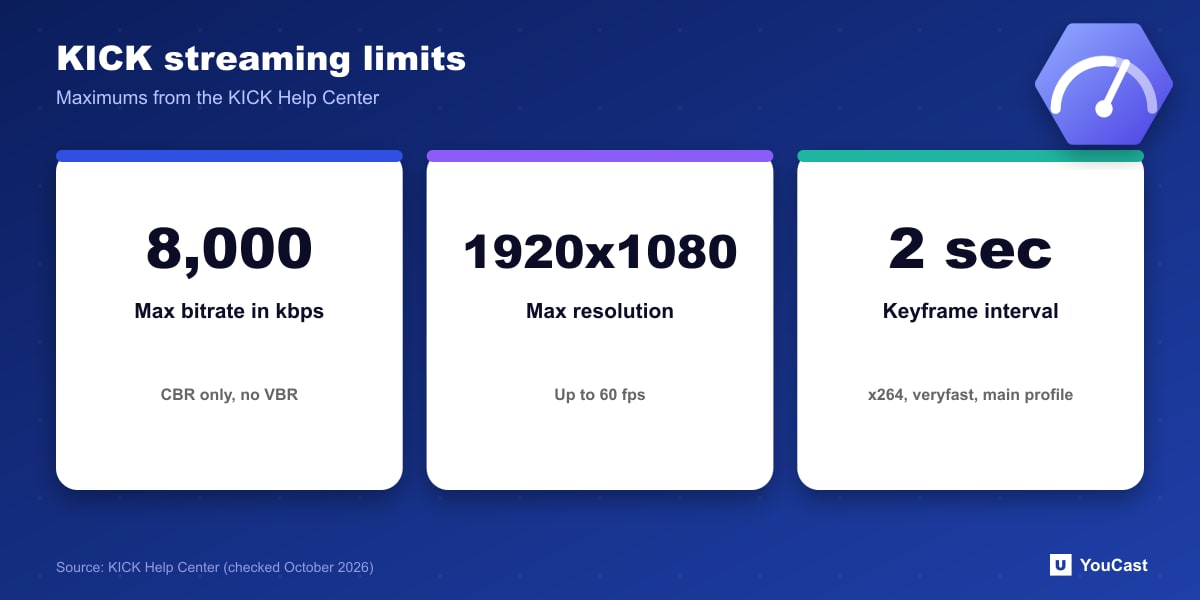
KICK explains the CBR rule this way: variable bitrate changes with what is on screen and can spike enough to overwhelm its servers. On a Mac, choose the x264 encoder to unlock CBR.
- Encoder: x264 or H.264 only. H.265 is not supported.
- Rate control: CBR only. Variable bitrate is not supported.
- Maximum bitrate 8,000 kbps, maximum resolution 1920x1080, maximum 60 fps.
- Audio: stereo, 48 kHz at most.
Recommended OBS Output Settings
For x264, KICK recommends CBR with a bitrate between 1,000 and 8,000 kbps, a 2-second keyframe interval, the veryfast CPU usage preset, the main profile and the zerolatency tune. Enable Rescale Output at 1920x1080 only if your base resolution is larger.
For NVIDIA NVENC H.264 and AMD HW H.264 the page lists CBR, the same bitrate range, a 2-second keyframe interval, the P6 Slower (Better Quality) preset, Ultra Low Latency tuning, single pass multipass mode and the main profile.
Connecting OBS
- 1In the KICK creator dashboard, open Channel, then Stream URL and Key.
- 2In OBS go to File, Settings, Stream and set the service to Custom.
- 3Paste the server URL and the stream key, then press Apply.
- 4Set the stream title and category in the Streamer Dashboard before going live. KICK warns the stream may not start correctly without them.
If the Stream Stutters
KICK suggests lowering the bitrate by 1,000 kbps at a time until the stream is smooth, and switching to a lighter preset: Superfast for x264, or P3 Fast for AMD and NVIDIA. For comparison with YouTube's much wider range of resolutions and codecs, see our encoder settings guide.
Let the Cloud Handle the Encoding
YouCast turns the videos you upload into a 24/7 live stream that runs from the cloud, to YouTube and, with a stream key, to Twitch, Kick and Instagram, so there is no encoder to configure, no computer to keep awake and no home upload line to saturate.
Kick limits bitrate to 8,000 kbps and resolution to 1080p at 60 fps. YouCast can stream a pre-recorded video to Kick with your Kick stream key, so choose a stream quality that stays inside those limits.
You can try one stream on the free trial and add more streams as the channel grows.
Sources
- KICK Help Center: How to stream on KICK.com — checked October 2026
- KICK Help Center: OBS or Streamlabs not connecting to KICK — checked October 2026
Further reading
- KICK Help Center: Understanding KICK's revenue split — The 95/5 split
- KICK Help Center: KICK payout schedule, thresholds, and methods — How payouts work
- OBS Studio: Quick start guide — Free streaming software documentation
Start Your 24/7 Stream Today
No PC needed. No OBS. Just upload your video and go live on YouTube — 24/7, from the cloud.