What Counts as Invalid Traffic
YouTube defines invalid traffic as any activity on your channel that does not come from a real user or a user with genuine interest. That can include fraudulent, artificial or even unintentional ways to boost ad revenue.
Its examples are automated or incentivized traffic from third parties, including traffic boosting services and others claiming to be legitimate ad networks, and announcing to viewers that they should watch or click through ads to boost ad revenue. YouTube analyzes the traffic itself, regardless of where or how it originated.
How It Affects Earnings
- Drops in views and earnings after Analytics adjusts for invalid traffic.
- Fewer ads on your channel while ad serving is temporarily limited.
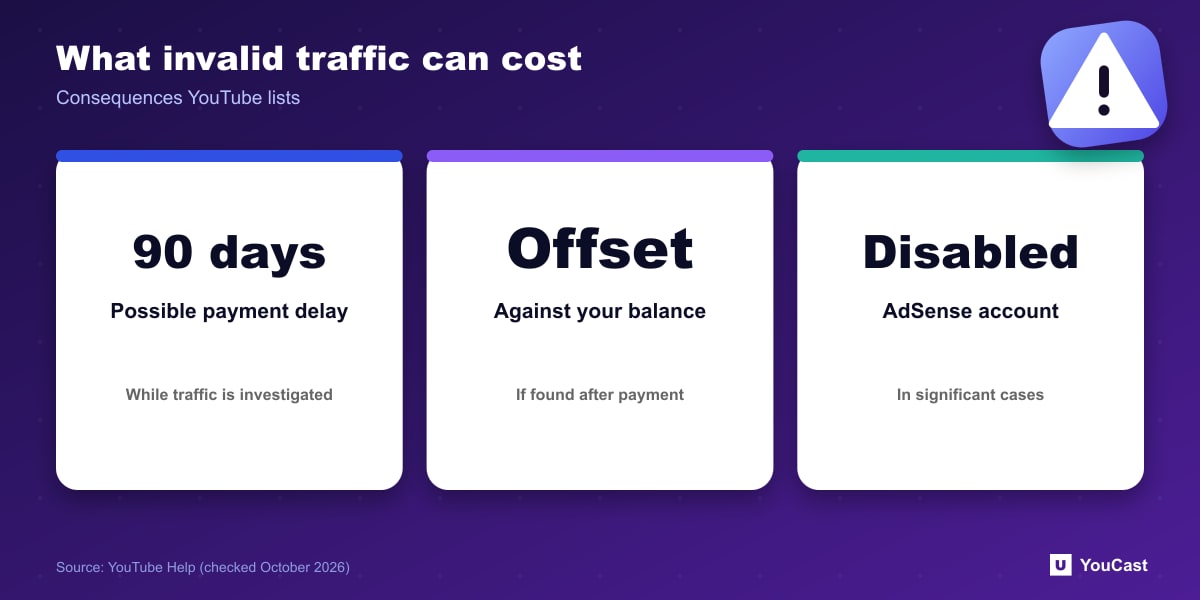
- Adjustments in AdSense: if invalid earnings are found after payment, the amount is offset from your current or future balance.
- Payments may be delayed up to 90 days to allow time to investigate.
- In cases of significant invalid activity, the AdSense for YouTube account may be suspended or permanently disabled.
Common Questions, Per YouTube
Editing, deleting or unlisting videos will not recover earnings tied to invalid traffic, since advertisers are not charged or are refunded for those views. YouTube says it will still recommend your videos if ad serving was limited, and viewers can still search for them.
YouTube also says none of these increase your risk of invalid traffic: embedding your content, using the Promotions tab in YouTube Studio, and using varying ad formats like mid-rolls.
What This Means for 24/7 Streams
Our reading: an always-on stream earns from real concurrent viewers, so any shortcut that adds fake viewers puts the whole channel's ad revenue and AdSense account at risk. Growth work should focus on titles, thumbnails and consistent scheduling instead.
Keeping a YouCast Stream Compliant
YouCast turns the videos you upload into a 24/7 live stream that runs from the cloud, to YouTube and, with a stream key, to Twitch, Kick and Instagram, so there is no encoder to configure, no computer to keep awake and no home upload line to saturate.
Do not buy viewers for a stream YouCast keeps online. Fake traffic risks the channel's earnings and AdSense account, while real viewers come from titles, thumbnails and consistency.
You can try one stream on the free trial and add more streams as the channel grows.
Sources
- YouTube Help: Invalid traffic on your videos — checked October 2026
Further reading
- YouTube Help: Get started with live streaming — Official overview of live streaming on YouTube
- YouTube Help: Choose live encoder settings, bitrates, and resolutions — The ingestion settings table
- YouTube Help: YouTube Partner Program overview & eligibility — Thresholds and benefits
- YouTube Help: YouTube channel monetization policies — What reviewers check
Start Your 24/7 Stream Today
No PC needed. No OBS. Just upload your video and go live on YouTube — 24/7, from the cloud.