Live Streams Are Scanned in Real Time
YouTube says all live streams are scanned for matches to third-party content, including copyrighted content in the form of another live broadcast. This is different from the claims you see after an upload, because it can act while you are still live.
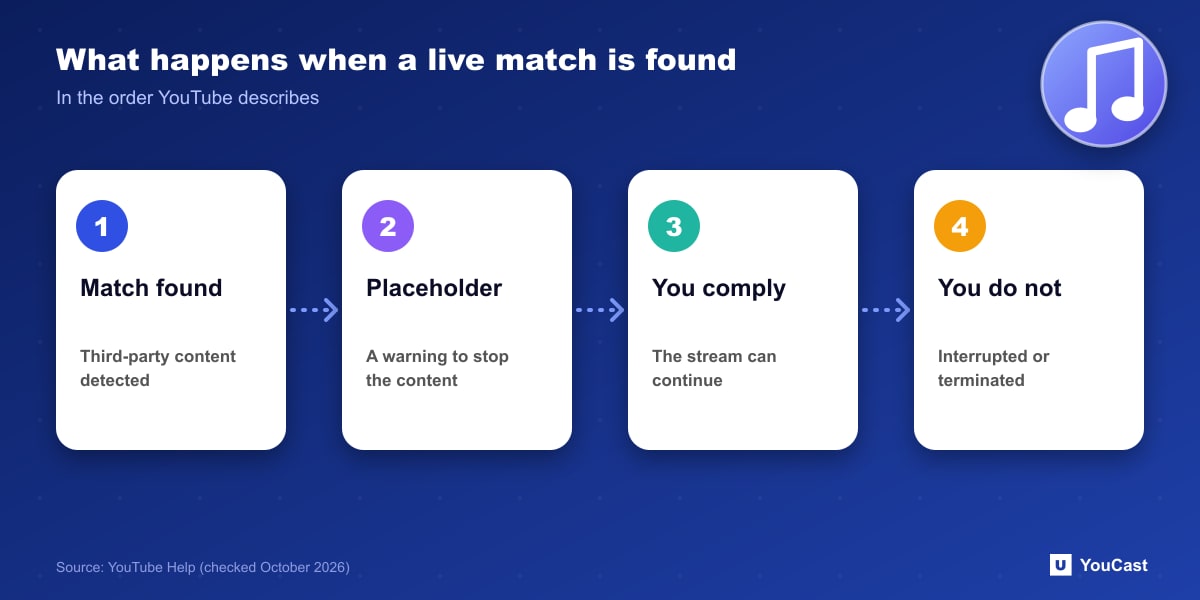
What Happens, in Order
The stream can also be terminated if you receive a copyright or Community Guidelines strike.
- 1Third-party content is identified, and a placeholder image may replace your live stream.
- 2You are warned to stop streaming the third-party content.
- 3If you comply and address the issues, the stream can continue.
- 4If the content remains, the stream is temporarily interrupted or terminated.
Getting Live Access Back
If a live stream stops, YouTube says to check the Studio dashboard for strikes. If you fix the issues listed, access to live streaming can be restored, and its page on resolving live restrictions explains the process.
Licensed Content and Archives
If you licensed third-party content, ask the owner to add your channel to their allowlist through Content ID. Without that, the stream can be interrupted even when you hold a license, and even when you restricted the stream to territories where you own the rights.
Content ID claims on archived live streams only happen after you complete the live stream, and only if you decide to archive the video.
Keeping a YouCast Stream Compliant
YouCast turns the videos you upload into a 24/7 live stream that runs from the cloud, to YouTube and, with a stream key, to Twitch, Kick and Instagram, so there is no encoder to configure, no computer to keep awake and no home upload line to saturate.
A copyright match can interrupt a live stream while you sleep. Check every video in your YouCast playlist for third-party music or footage before it goes live.
You can try one stream on the free trial and add more streams as the channel grows.
Sources
- YouTube Help: Copyright issues with live streams — checked October 2026
Further reading
- YouTube Help: Get started with live streaming — Official overview of live streaming on YouTube
- YouTube Help: Choose live encoder settings, bitrates, and resolutions — The ingestion settings table
- YouTube Help: YouTube Partner Program overview & eligibility — Thresholds and benefits
- YouTube Help: YouTube channel monetization policies — What reviewers check
Start Your 24/7 Stream Today
No PC needed. No OBS. Just upload your video and go live on YouTube — 24/7, from the cloud.