During the Stream (Live Control Room)
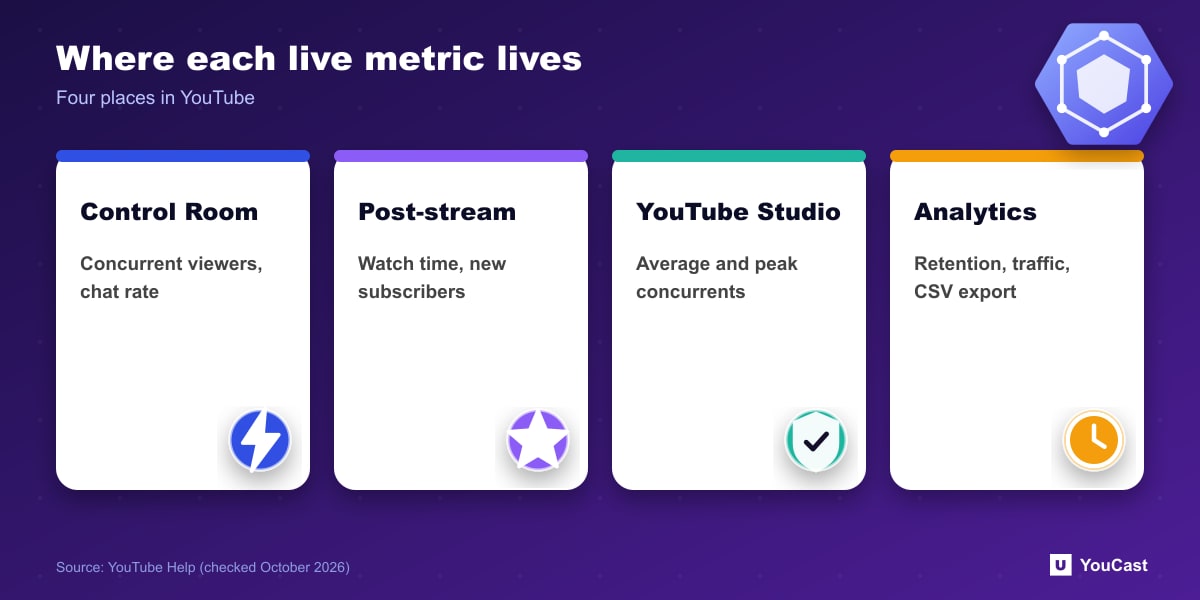
- Concurrent viewers and peak concurrent: viewers at the same time and the highest number during the stream.
- Duration, likes (which transfer to the archive) and chat rate in messages per minute.
- Views while live and average view duration, the estimated minutes watched per view.
- Stream health and status, including specific error messages.
After the Stream
The post-stream snapshot shows views, new subscribers, total watch time, peak concurrents, duration, average view duration and reactions. In YouTube Studio, video-level analytics add average and peak concurrent viewers, key moments for audience retention and reminders set. Channel-level analytics show average and peak concurrents across streams and hours streamed.
In YouTube Analytics
In YouTube Analytics you can sort by Live, On demand, or Live & on demand and get watch time reports like regular uploads, including audience retention, demographics, playback locations, traffic sources and devices. Peak concurrents and chat messages are available at video level within minutes of the stream ending, and the data can be downloaded as CSV.
YouTube notes that Analytics data is based on video ID, is processed and despammed, and measures different information from the Live Control Room. Interaction and revenue reports are not available when filtering for live only.
Dual-Stream Metrics
When you stream both horizontally and vertically, Live Control Room metrics are combined. Metrics for just the vertical stream appear 24 hours after the stream: in Advanced mode, break down by Playback location over a period longer than the first 24 hours and tick Vertical live feed.
Run the Stream, Spend Time on Growth
YouCast turns the videos you upload into a 24/7 live stream that runs from the cloud, to YouTube and, with a stream key, to Twitch, Kick and Instagram, so there is no encoder to configure, no computer to keep awake and no home upload line to saturate.
Check concurrent viewers, watch time and retention in YouTube Studio, then change the title, thumbnail or playlist in YouCast between runs and compare the next week.
You can try one stream on the free trial and add more streams as the channel grows.
Sources
- YouTube Help: See your live stream's metrics — checked October 2026
Further reading
- YouTube Help: Get started with live streaming — Official overview of live streaming on YouTube
- YouTube Help: Choose live encoder settings, bitrates, and resolutions — The ingestion settings table
- YouTube Help: YouTube Partner Program overview & eligibility — Thresholds and benefits
- YouTube Help: YouTube channel monetization policies — What reviewers check
Start Your 24/7 Stream Today
No PC needed. No OBS. Just upload your video and go live on YouTube — 24/7, from the cloud.